


Ever feel like your TikTok feed is showing you everything except what you want to see? Are you wondering if your content is reaching the right people?
If so, you may need to know how to reset TikTok algorithm.
Whether you’re a creator trying to reach a new audience, a business looking to target better leads, or just a user wanting a cleaner feed, resetting your TikTok algorithm can make a huge difference.
In this guide, we’ll walk you through how the TikTok algorithm works, why it gets stuck sometimes, and how to reset it step by step.
You’ll also learn how to create a more personalized For You Page (FYP) and use the algorithm to grow your TikTok followers and reach your target audience.
Alright, let’s do it!
Table of Contents
Key Takeaways
- You control the algorithm. By adjusting your behavior and settings, you can reset and retrain TikTok to show the content you actually want.
- A clean For You Page helps growth. Shaping your FYP around your niche increases engagement, relevance, and visibility, especially for creators and brands.
- Resetting boosts performance. Clearing cache, unfollowing accounts, and engaging intentionally helps TikTok serve you (and your content) more effectively.
What Should We Know About the TikTok Algorithm?

TikTok’s algorithm is designed to learn fast—sometimes a little too fast. It picks up on every tap, view, and scroll, curating your FYP based on:
- Watch time: The longer you watch a video, the more TikTok thinks you like that type of content.
- Engagement: Likes, comments, shares, and saves all boost a video’s reach and tell the algorithm what to show you more of.
- Skipped content: If you scroll quickly, TikTok takes note and deprioritizes similar content.
- Search activity: What you search tells TikTok what you’re curious about or want to learn.
- Account preferences: Language, device type, and location influence what’s shown to you.
But it’s not just about what you like; it’s also about what you avoid. TikTok constantly fine-tunes your feed based on what you do not engage with.
If you don’t interact with a certain type of video, TikTok will start to hide similar content. Over time, this creates a highly personalized experience. For that reason, it’s important to know how to reset TikTok algorithm.
Creators and businesses need to understand this because the algorithm directly controls who sees your content. If you accidentally binge videos outside your niche, like watching pet videos when you’re running a fashion brand.
TikTok may stop promoting your content to the right audience. That’s why understanding how to work with the algorithm, not against it, is key to building visibility and engagement.
If you accidentally binge videos outside your niche, the algorithm may stop showing your ideal content, or stop promoting yours altogether.
Resetting the TikTok Algorithm With the Most Effective Methods
Resetting the algorithm doesn’t mean starting from scratch or deleting your account. Instead, it’s about reshaping your behavior so TikTok can better understand your current interests and goals.
Clear Cache
Your cache stores temporary data that helps the app run faster, but it can also keep old behavior patterns alive.
Clearing your cache won’t affect your followers, videos, or messages, but it clears TikTok’s memory of some viewing habits.
Steps:
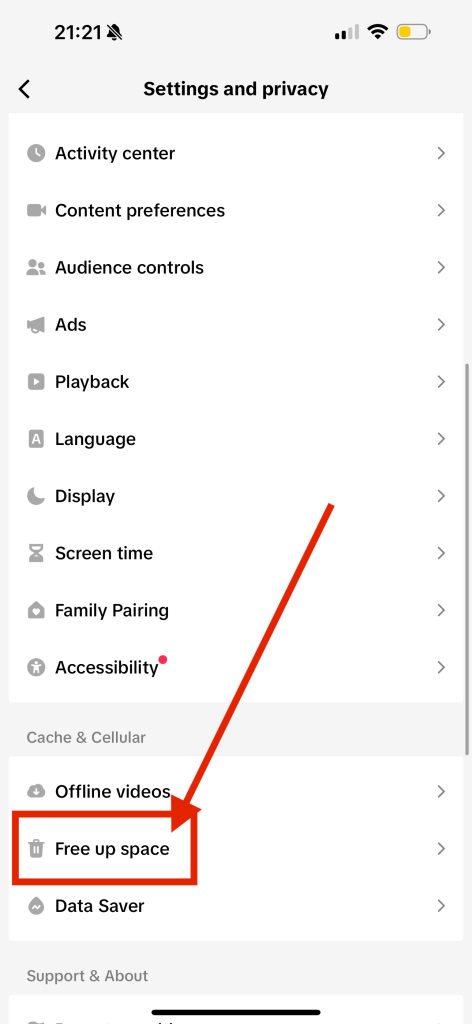
- Go to your profile.
- Tap the three-line menu in the top right.
- Go to Settings and Privacy.
- Tap Free up space.
- Tap Clear cache.
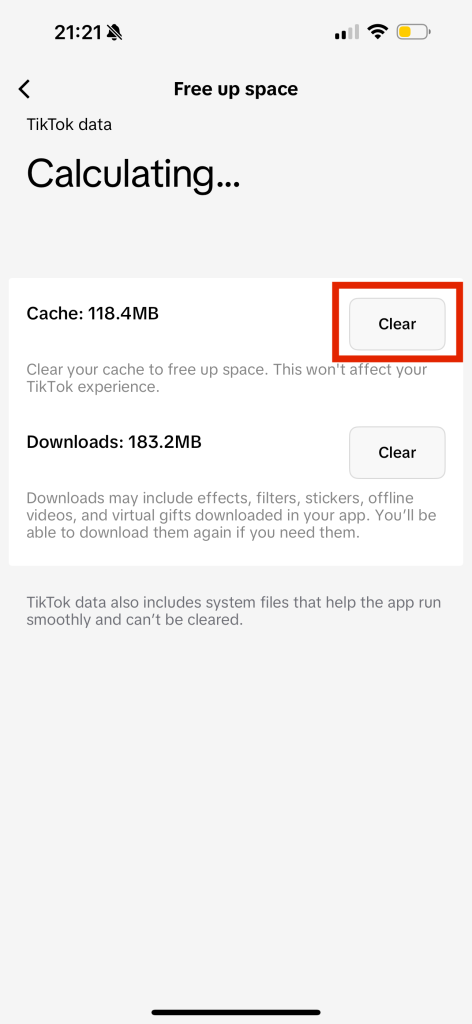
Once cleared, TikTok will begin to rebuild your preferences based on what you watch and engage with next. Use this moment to be very intentional with your activity.
Dislike the Videos
One of TikTok’s most underrated features is the “Not Interested” option. When used regularly, it helps train your feed to filter out content you don’t want. This is a great way for how to reset TikTok algorithm because it explicitly tells TikTok what you don’t like.

How to do it:
- Tap and hold on a video.
- Select Not Interested.
Use this whenever you see a video that’s irrelevant, off-brand, or simply annoying. Doing this frequently helps TikTok understand what content doesn’t belong on your feed.
Cancel Following for Accounts You Don’t Like
Following a creator impacts your algorithm. If you’re still following accounts from an old interest, trend, or phase, they’re influencing what TikTok shows you.
Steps to clean up:
- Go to your profile and tap Following.
- Browse your list and unfollow accounts that don’t align with your current interests.
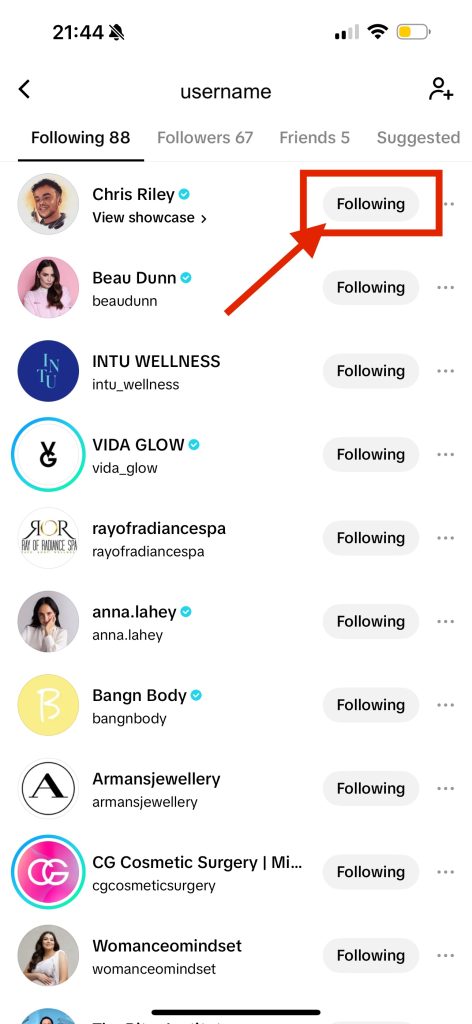
This declutters your feed and sends clearer signals to TikTok about the types of videos you want to see and want to create.
You can also buy TikTok views for videos you want to increase reach on so they can get more traction against the algorithm.
Create a Unique For You Page
Your FYP is your personalized homepage on TikTok. It’s where discovery happens!
Whether you’re a casual user looking for entertainment or a brand trying to reach new customers, resetting and intentionally shaping your FYP isn’t just about seeing better content.
It’s a powerful way to refocus your TikTok experience so it aligns with your goals, interests, or business niche.
Why is this important? Because the TikTok algorithm learns from what you watch.
For example, if you want to grow as a fitness coach, but your FYP is full of cooking videos, you’ll not only feel distracted—you’ll also send mixed signals to the algorithm.
By curating a custom FYP, you’re essentially telling TikTok, “This is who I am. Show me, and promote, this kind of content.”
Here’s how to take control of it:
- Watch within your niche: Spend time watching videos that reflect the type of content you want to consume or create. If you’re a beauty creator, search for skincare routines or makeup tutorials. If you’re a brand, look for competitors or top creators in your space.
- Search and explore hashtags: Use the search feature to explore relevant hashtags like #FitnessTips, #ArtistTok, #RealEstateTok, or #EcommerceHacks. Viewing and interacting with content under those hashtags tells the algorithm what matters to you.
- Engage intentionally: Every like, comment, or share shapes your algorithm. Avoid liking just for fun. Interact with content that aligns with your goals or audience. This will help TikTok understand your interests more clearly.
- Follow wisely: Follow creators, educators, or businesses who consistently post content that aligns with your vision. This not only helps your feed improve but can inspire your own content strategy.
A curated FYP helps you:
- Stay motivated by seeing content that supports your goals
- Stay ahead of trends in your industry or niche
- Engage more meaningfully with other creators or brands
- Create better-performing content by learning what works
By being more mindful and selective, you can sculpt a feed that gives you daily inspiration and helps you stay on trend in your niche.
Whether you’re trying to grow your brand or build a more enjoyable feed, a personalized FYP makes TikTok work for you, not against you.
TikTok Tips to Stand Out
After resetting your algorithm, you’ll want to make sure you’re taking advantage of your clean slate. Here’s how to stand out—especially if you’re a business or creator looking to grow:
- Use trending sounds with a twist: Pick popular audio, but customize it to your topic or niche. This boosts reach while staying relevant.
- Post consistently: The algorithm favors active accounts. Aim for at least 3-5 videos per week.
- Experiment with formats: Try tutorials, behind-the-scenes, mini-vlogs, and duets to keep your audience engaged.
- Use SEO in captions: Add relevant keywords to your video descriptions (like “how to style streetwear” or “email marketing tips”).
- Create an engaging TikTok Bio: Your bio should captivate anyone who visits your profile and explain exactly what your account is all about. A good bio can bring in more followers who land on your page.
- Engage with others: Respond to comments, stitch relevant videos, and answer questions via video replies.
These moves help you gain visibility with the right audience, so every video has a higher chance of success.
FAQ
Still have some questions about how to reset TikTok algorithm? We got you covered with our detailed FAQ. Check it out before you go!
How do I restart my TikTok algorithm?
Restarting your TikTok algorithm is a combination of resetting old behavior and setting new signals:
- Clear the cache to wipe temporary data.
- Use “Not Interested” to filter out videos.
- Unfollow irrelevant accounts.
- Start watching content in your niche.
It takes a few days to see changes, but the more consistent you are, the faster the reset will work.
How do I change the algorithm on my TikTok?
You can’t directly change the algorithm itself, but you can influence how it works for your account. Treat your actions like teaching TikTok what matters to you:
- Engage only with content you want to see more of.
- Use specific hashtags and search terms.
- Create or consume videos related to your niche.
Changing the algorithm is about teaching it what you want—and unteaching it what you don’t.
How do I reset my TikTok activity?
While TikTok doesn’t offer a button to reset all activity, you can:
- Clear cache in app settings.
- Unlike old videos in your Liked tab.
- Clear search history by tapping the search bar and manually deleting past searches.
These steps reduce the influence of past behavior, giving you a cleaner slate.
How do I reset my TikTok recommended?
Resetting your recommendations takes consistent effort:
- Use “Not Interested” on content you dislike.
- Engage with new interests through search, likes, and follows.
- Avoid passive watching of unrelated content.
In some cases, people start a second account to completely reset recommendations, especially if they’re shifting their niche or launching a new brand.
Understand the TikTok Algorithm and Use It to Your Advantage
Now that you’ve reset your algorithm, it’s time to put it to work. The TikTok algorithm can help your content reach thousands (or even millions) of viewers if used correctly.
Here’s how savvy creators and businesses optimize their content:
- Hook quickly: Capture attention in the first 1: 2 seconds with text, sound, or motion.
- Create loops: Videos that restart smoothly keep viewers watching longer, which boosts visibility.
- Add keywords in TikTok captions and TikTok hashtags: This helps TikTok categorize your content accurately.
- Engage immediately after posting: Reply to early comments to show the algorithm your video is active.
By aligning your strategy with what the algorithm wants—engagement, relevance, and consistency—you give your content the best chance to thrive.
Final Thoughts: How to Reset TikTok algorithm
Knowing how to reset TikTok algorithm isn’t just about getting rid of annoying videos: it’s a smart move for creators and businesses who want to grow with intention.
By clearing out the noise, you can guide your For You Page and content strategy in a more profitable direction.
Take the time to reset, re-engage, and create. Your refreshed TikTok experience will feel more relevant, rewarding, and aligned with your goals.