


If you’re wondering how to see profile views on TikTok, you’re not alone. Many users are curious about who’s checking out their TikTok profile and what that says about their content’s reach.
Understanding profile views can give you valuable insights into your audience’s interest and the performance of your videos.
Whether you’re just starting or have been on TikTok for a while, knowing how to track who views your profile is an essential part of engaging with your followers.
In this guide, we’ll walk you through the steps and tips for seeing profile views on TikTok.
Table of Contents
Key Takeaways:
- Track Profile Views: To see who’s viewed your TikTok profile, enable the profile view history in the privacy settings, and check the footprints icon on your profile page.
- Privacy Control: You can manage who sees your profile view history by adjusting your privacy settings, giving you control over who can view this information.
- Post View Insights: You can also track individual post views to see which TikTok videos are performing best and engaging your audience.
- No Notifications for Profile Views: TikTok doesn’t notify users when someone views their profile, so you need to manually check your profile view history.
- Enable Feature: If you don’t see the profile view option, ensure your app is updated and check that the feature is available and activated in your region.
What Are Profile Views on TikTok?

When using TikTok, many of us are curious about how to see profile views on TikTok and who’s checking out our content.
Your TikTok profile is a reflection of who you are: it shows users your creativity and keeps them engaged through shared interests.
Profile views help you understand who is actually interested in your content. Using this metric shows you which videos have the best performance.
Tracking this profile view history metric you can better understand which of your TikTok videos is bringing in the most viewers and adjust your content strategy accordingly.
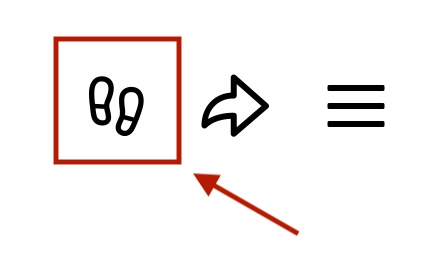
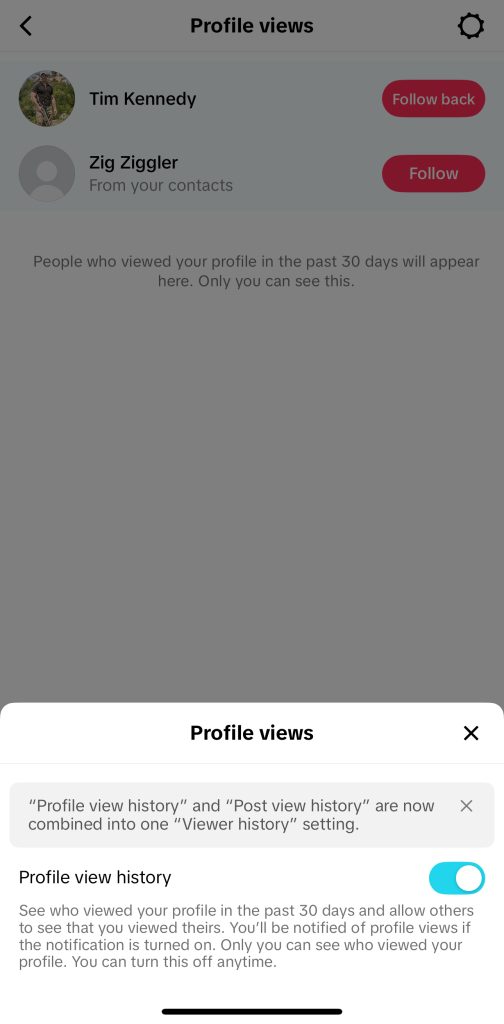
In the app, you can navigate to your profile to see who viewed your page. Click the footprint icon in the top right corner to see which users have visited your profile.
This is a great feature because it lets you see just who checked you out and what type of audience might care about your content.
Also, if you’ve noticed an increase in followers or views lately, it’s a good idea to check your profile view history on TikTok. You can compare to see if any of these viewers have become new followers and can then gain insight into which videos may have got them to your page.
Keep in mind that TikTok users can view your profile, but they can’t necessarily see who else viewed your profile. You control this under privacy settings.
You can choose who can see your profile view history and manage your TikTok accounts by navigating to the Privacy menu.
Pro Tip: To give a push to your profile, consider buying TikTok views. This can help increase visibility and attract more viewers to your content. Just make sure to use trusted services for real, engaged users to maintain authentic growth.
Gain More TikTok Likes Today!
Get real likes on your TikTok videos quickly and easily. Stand out and let more people enjoy your content.
Get More TikTok Views Today!
Make your videos seen by more people with real views. Don’t let your creativity go unnoticed.
Gain More TikTok Followers!
Get real followers fast and make your profile shine. Join others who trust us to grow their TikTok accounts.
How to See Profile Views on TikTok (Step-by-Step)
Ready to learn how to see profile views on TikTok? Let’s get into it.
This feature allows you to see who has viewed your TikTok profile recently, ultimately helping you gauge content performance.
Here’s a simple guide to see your viewers:
- Open the TikTok App and go to your profile: Open the TikTok app and tap on your profile icon at the bottom right of the screen.
- Find for the Footprints Icon: On your profile page, look for the footprints icon. This is where TikTok displays who’s been checking out your profile.
- Tap profile views: Tap on the footprints icon to view a list of people who have looked at your TikTok profile. This is a comprehensive list.
- Enable Profile View History: If you haven’t already, you can enable profile view history directly from the footprints menu. Keep in mind if you turn this off, you cannot see who viewed your profile.
- Bonus: Check Post-View History: To understand how your TikTok videos are performing, you should also check your post’s view history. This metric shows how many people have viewed your videos and can be a direct indicator of which videos are most popular.
These steps are very simple. Once you take a look, you’ll be able to see exactly which TikTok users are engaging with your content and gain insisght into the success of your TikTok videos!
Enabling Profile View History on TikTok
To fully enjoy the benefits of how to see profile views on TikTok, you need to enable the profile view history feature.
By activating this, you’ll be able to track everyone who has viewed your TikTok profile, helping you understand how well your videos are performing and who is engaging with your content. Here’s how to do it:
- Open the TikTok App: Launch the TikTok app and tap your profile icon in the bottom right corner of the screen. This will take you to your TikTok profile page.
- Access Privacy Settings: On your profile page, look for the three-line icon at the top right. Tap it to open your settings.
- Select Settings: In the settings menu, choose select settings. From there, you’ll be directed to the privacy settings where you can manage your preferences.
- Enable Profile View History: Once in the privacy section, look for the option to enable profile view history. By turning this on, you’ll be able to see who has viewed your TikTok profile over time. This allows you to track your profile views more effectively.
- View History: With the profile view history enabled, you can easily tap on the footprints icon on your profile page to see a list of users who have viewed your TikTok recently. This view history will provide valuable insights into how your content is being received by TikTok users.
Fun Fact: Did you know that TikTok has been downloaded 4.92 billion times worldwide? Its rapid growth makes it one of the most popular apps for creative content.
How to See Post Views History
In addition to checking your TikTok profile views, you can also track your post view history.
This feature allows you to see how many people have viewed your TikTok videos, helping you gauge the popularity of each post.
It’s a great tool for understanding which content resonates the most with your audience. Here’s how you can track post views on TikTok:
Open the TikTok App
First, open the TikTok app and tap your profile icon in the bottom right corner. This will take you to your TikTok profile, where all your posts are displayed.
Find the Video You Want to Analyze
Visit your profile page and select the TikTok video you want to analyze. Each video on your TikTok profile has a specific post-view history you can access so that you can better understand how it is performing.
Tap the Lines Icon (Menu)
Once you choose a video, tap the three dot icon at the bottom of the screen. This will give you access to all video options; click on the first one at the bottom, analytics, to see all the video metrics.
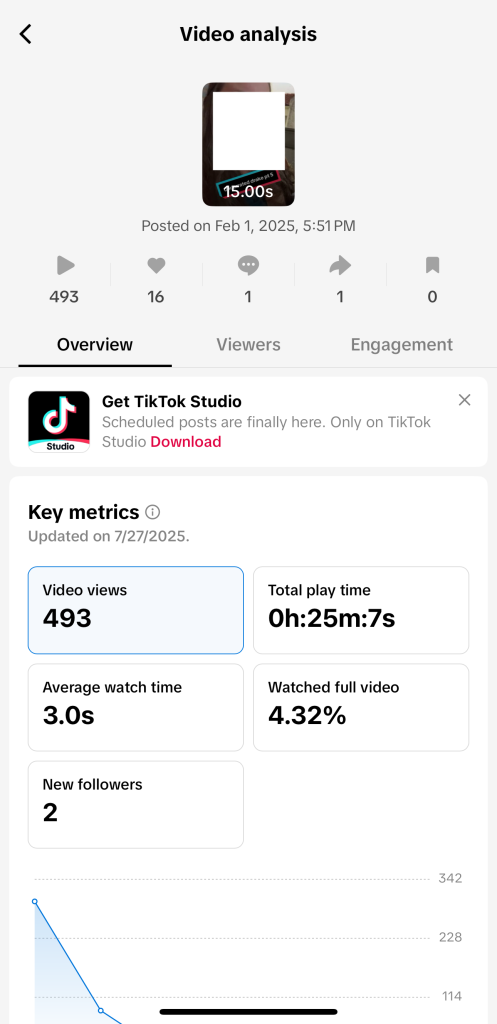
You can also use additional TikTok analytics to get a full picture of your performance.
View Post History
In the creator tools, you’ll see detailed stats about the video, including the total TikTok video views. This will help you understand how many people have interacted with that post.
You can also see if other users have shared or commented on your video, giving you a sense of how far your content has reached.
Track Engagement
With this information, you’ll be able to assess which TikTok videos are drawing in the most viewers and generating the most interaction. It also helps you track the success of your content in terms of viewing your TikTok profile and engagement.
Understanding Who Views Your TikTok Profile

One of the most exciting features of TikTok is the ability to see who views your TikTok profile.
This can give you insights into the level of interest people have in your content and how your videos are performing.
By enabling the profile view history feature, you can track who has been engaging with your TikTok profile. Here’s how it works:
Who Can See Your Profile Views?
When you allow profile view history, you can see who viewed your TikTok profile. The profile views will include views from your followers as well as other users who may have discovered your content and checked out your page.
However, it’s important to note that if your settings are restricted, you may not see who views your profile.
This privacy feature gives you control over who can see your profile views page and who sees you viewing their page.
Adjusting Privacy Settings
TikTok offers a good amount of control it comes to privacy. You can make your profile public or private, depending on your preference.
To manage this, go to settings and privacy. You can also manage who sees your views directly from the footprint menu.
Tracking Views with Creator Tools
For users looking to dive deeper into their engagement, creator tools provide valuable stats. These tools allow you to track video views and assess the performance of individual posts.
You can even track tracking views across your TikTok profile, helping you understand the correlation between post performance and profile visits.
Notifications and Insights
Another important point is that TikTok does not notify you when someone views your profile, so it’s up to you to keep track.
If you’re curious about your follower count or the impact of a specific post, you can visit the profile views page in your TikTok app.
This page will give you a summary of who’s interacted with your profile recently.
Upgrade Your TikTok Game with TokUpgrade!
We offer cheap views and followers with real TikTok users who’ll love your videos.
Conclusion
Understanding how to see profile views on TikTok is a great way to learn more about your audience and the performance of your TikTok content.
By enabling the TikTok profile view history, you can track who’s engaging with your profile and videos. If you find that the profile views TikTok not showing, it could be due to privacy settings or feature availability.
If you’re asking, why can’t I see my profile views on TikTok, simply check if you’ve activated the feature? Remember, TikTok does not notify you when someone views your profile, so keep an eye on your profile icon for updates.
Frequently Asked Questions
Why can’t I see profile view on TikTok?
If you can’t see your profile views on TikTok, it might be because the profile views feature is not enabled. You can check if you’ve activated it in settings and privacy.
If the feature is disabled, follow the steps to turn it on and start tracking your profile views. If it’s not showing, ensure your account has access to this feature and check for any updates to the TikTok app.
How do I turn on profile views on TikTok?
To turn on profile views on TikTok, tap your profile icon and go to settings and privacy. From there, look for the privacy settings where you can enable the profile views feature.
This will allow you to track who’s been checking out your TikTok profile. If you don’t see the option, try updating the app or check for any restrictions on your account.
Keep in mind, does TikTok notify you when someone views your profile? No, TikTok doesn’t notify you when someone views your profile, so you’ll have to check your profile view history manually.
Does TikTok show when I view someone’s profile?
No, TikTok does not notify you when someone views your profile. While you can track who views your TikTok profile, TikTok does not send notifications to users when you visit their profile. This gives users privacy when exploring other users’ profiles.
How to turn on profile views on TikTok if the eye isn’t there?
If the eye icon isn’t showing in your profile icon, it likely means that the profile views feature is not available or needs to be turned on.
To enable it, go to settings and privacy and ensure the feature is activated. If you don’t see it, make sure your app is updated and check if the profile views feature is available in your region.