




TikTok is one of the most popular social media platforms and offers a wide range of features to its users, content creators, and businesses.
In fact, TikTok is always adding new ways to help users connect with their followers, and one of those popular features is Stories.
Stories let you share quick, casual updates that disappear after a while. But what if you change your mind after you post? Are you stuck with it?
Don’t worry, it’s super easy to learn how to delete TikTok story.
In this guide, we’ll show you exactly how to delete Story on TikTok, step by step. We’ll also cover other common questions about TikTok Stories so you can feel confident using the feature.
Table of Contents
What is a Story on TikTok?

A TikTok Story is a short video or photo you can post to your profile that disappears after 24 hours. They work a lot like Instagram or Snapchat Stories, so if you’re familiar with those, you won’t have much trouble using them.
When you post a TikTok story, your followers will tap on your profile picture to view it. TikTok stories are a great way to share behind-the-scenes moments, daily updates, or quick thoughts that don’t need to stay on your profile forever.
This is especially true if you have a certain profile aesthetic, but you still want to share everyday moments with your followers and viewers.
For example, if you’re at a concert or trying out a new recipe, you might post a quick TikTok story showing what you’re doing at the moment. Businesses might post a BTS look at a new photoshoot or a pre-launch advertisement. This will leave their feed uninterrupted, but still engage their followers.
Your followers get a much-needed glimpse into the day-to-day without cluttering your main feed.
Do TikTok Stories Expire?
Yes! TikTok Stories automatically expire 24 hours after they are posted. That means you don’t have to delete them yourself, and after the time runs out, they will disappear from the platform. Users can no longer see them, but you still have access to them.
If you don’t want to wait 24 hours, and you post something by accident or change your mind, you can delete it early without issue.
Let’s say you uploaded a quick clip of a new product with a promo price but didn’t realize that it was the wrong offer. Instead of letting it sit there for 24 hours and confuse your followers, you can simply go in and remove it immediately.
Even if you realize that your TikTok story has been up and you want it gone, it’s better to take it down right before it expires than leave your story up. When in doubt, delete it.
How to delete TikTok story: Step-by-step guide
Ready to learn how to delete TikTok story? The good news is that it only takes a few taps. Just follow these foolproof steps:
Step 1: Open the TikTok app on your device
First, open the TikTok app on your phone or tablet. Make sure you’re logged into the account that posted the Story you want to delete. If you’re using multiple accounts, double-check that you’re on the right profile by tapping your profile icon and reviewing the username.
Step 2: Open your Story

Go to your profile by tapping the profile icon in the bottom right corner. If your Story is still active, you’ll see a blue ring around your profile picture. Tap your profile photo to open your current Story.
If you posted multiple Stories in a day, you can tap through them to find the specific one you want to delete.
Step 3: Tap on the share box to find the delete option
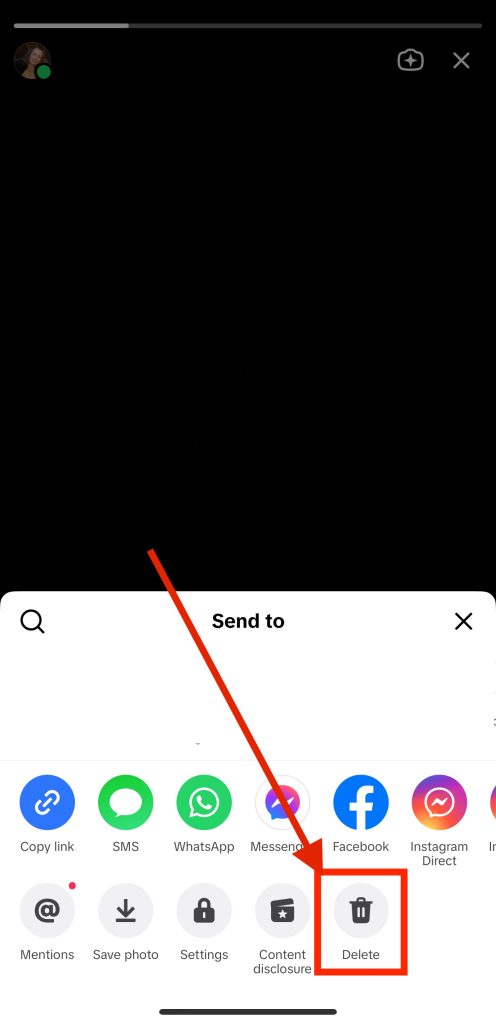
While watching your Story, look for the three dots or the share arrow icon (usually in the bottom-right corner).
Tap it to bring up more options, such as Save, Share, or Delete.
This menu might also include options to adjust who can see your Story or to turn off comments, giving you more control over how it’s shared.
Delete the Story post
In the options menu, tap “Delete” (it may be shown as a trash can icon). TikTok will ask you to confirm your choice with a pop-up.
Tap “Delete” again, and the Story will be removed instantly.
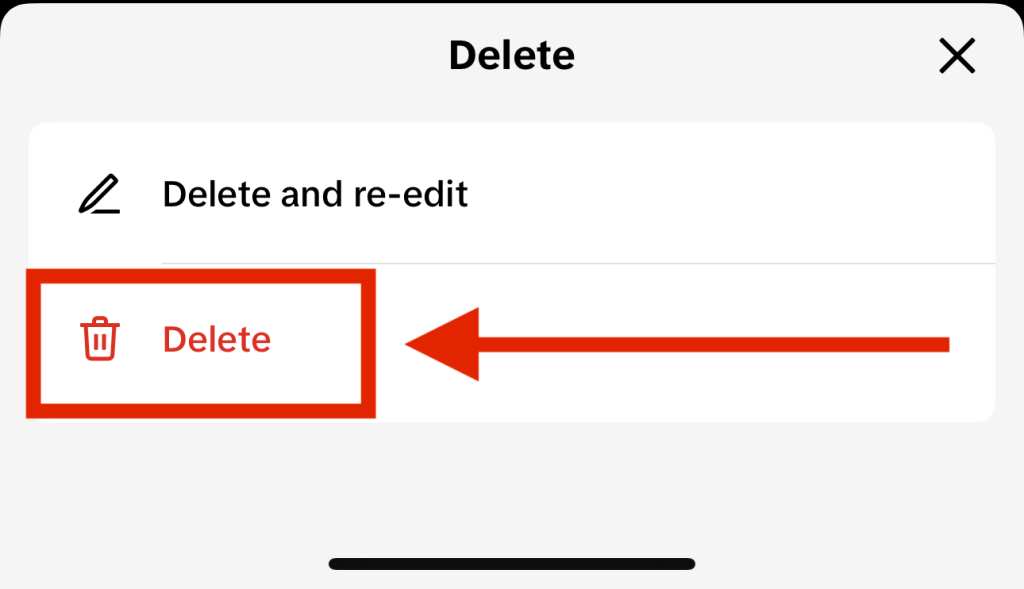
Once deleted, the Story will no longer be visible to your followers or anyone else. This action cannot be undone.
Can You Recover a Deleted Story on TikTok?
Unfortunately, no. Once you delete a TikTok Story, it’s gone for good. TikTok doesn’t offer a way to recover deleted Stories. So, if you delete it by mistake, you’ll have to redo the post.
If you think you might want to keep a copy, consider saving the Story to your phone before deleting it.
To save a Story before deleting it:
- Open the Story.
- Tap the three dots or share icon.
- Choose “Save Video” to download it to your device.
This is a smart habit to get into if you create TikTok content you might want to reuse later for a compilation video or share on another platform like Twitter or YouTube Shorts.
Can You See Who Viewed Your TikTok Story?
Yes! TikTok lets you see who viewed your Story, which is a cool feature if you’re curious about your audience. It’s also very useful for creators and brands to understand the reach their stories are getting and how their follower relationship is.
To check your TikTok Story viewers:
- Go to your profile.
- Tap your profile picture to view your Story.
- Swipe up on the screen.

After you complete those steps, you will see a list of users who viewed it. Just keep in mind that only you can see this list. If someone views your Story, they’ll show up in your viewers, even if they don’t follow you.
This list is especially beneficial for creators who want to know which followers are most engaged. For example, if a brand is watching all your Stories, that might be a hint they’re interested in working with you, or that they value your content.
It can also benefit brands and businesses with many repeat viewers. They can become clients or supporters if they religiously view your TikTok Story.
If someone views your TikTok story with an anonymous TikTok viewer, you won’t be able to see that view.
Why Delete a TikTok Story?
Here are some common reasons users delete their Stories on TikTok:
- Posted by accident. Maybe you uploaded the wrong video or included something you didn’t mean to share.
- Typo or mistake in the Story. You might have included the wrong caption or forgotten to tag someone.
- Changed mind about sharing something. It’s okay to decide later that something doesn’t fit your brand or vibe.
- Keep TikTok profile aesthetic tidy. Deleting Stories helps you manage your content, especially if you’re trying to create a cleaner or unified look.
Example: perhaps you’ve been experimenting with new content styles and you try something silly on your Story, but it doesn’t get the reaction you hoped for. Instead of leaving it up and feeling bad about it, you delete it and try again with something different.
Tips for TikTok Stories

Now that you know how to delete TikTok story, you can experiment with them without fear!
Here are a few extra things to keep in mind:
- You can add effects, music, and stickers to TikTok Stories just like regular posts. Try adding text to highlight key points or using trending sounds to boost engagement.
- You can post multiple Stories in one day, and they’ll all appear in order. This is helpful if you want to break up a longer message or create a mini-vlog.
- Stories are a great place to test ideas or ask quick questions. Use the Q&A sticker to get feedback from your followers or run informal polls to boost interaction.
- You can use apps to easily create engaging TikTok Videos.
Example: If you’re considering creating a new product or trying a new dance challenge, post a Story asking your followers what they think about it. It’s a fast, fun way to get feedback and your audience feels more connected and engaged with you.
Final Thoughts: How to Delete TikTok Story
TikTok Stories are a fun way to share quick moments without the pressure of creating a full video. But if you ever need to know how to delete TikTok Story, now you know exactly how to do it.
Just open the app, tap on your Story, go to the options, and hit delete. It’s quick, easy, and gives you more control over your content.
Whether you’re new to TikTok or already a pro, knowing how to manage your Stories can help you get the most out of the social media platform. Use Stories to experiment, connect with followers, and share the moments that matter. Don’t stress if you want to delete something. You got this!
If you need extra help to delete a TikTok account or a guide on how to delete TIkTok comments, check out our blog!