



If you’ve ever created a TikTok video, saved it for later, and then couldn’t find it again, you’re not alone. One of the most common questions creators ask is: “Where are my drafts on TikTok?”
Whether you’re saving videos to finish editing later or keeping ideas private until they’re ready to post, understanding how TikTok drafts work is essential for creators and businesses alike.
Drafts are like your personal TikTok workspace; they offer a place to store unfinished videos, test filters, or plan your content calendar.
In this guide, you’ll learn exactly where to find your TikTok drafts, how to save them properly, how to edit and delete them, and even how to transfer them to your camera roll.
Let’s break it down step by step so you’ll never lose track of your TikTok drafts again.
Table of Contents
What Are TikTok Drafts?
TikTok drafts are saved versions of videos that you’ve recorded but haven’t posted yet. They’re stored locally on your device within the TikTok app, not in the cloud, which means you can view, edit, and post them later.
Drafts are perfect for creators who like to plan ahead, businesses scheduling campaign content, or anyone who wants to experiment with effects before publishing.
For example, you might film a product demo, save it as a draft, and return later to add captions, trending sounds, or a new hashtag strategy before posting.
You can also use your drafts and edit in another TikTok video making app.
How to Save a TikTok Draft
Saving a TikTok draft is simple and only takes a few seconds once you’ve recorded your video.
Step 1: Open TikTok
Launch the TikTok app on your phone. Make sure you’re logged into the correct account — drafts are saved locally and can’t be accessed from other devices or accounts.
Step 2: Make Your Video
Tap the “+” button at the bottom center of the screen to create a new TikTok. Record your video or upload clips from your camera roll. You can trim, add sounds, filters, text, and effects before saving.
Step 3: Save Your Draft
When you reach the posting screen, instead of tapping “Post,” tap “Drafts” in the bottom-left corner. Your video will be saved to a private Drafts folder inside your profile.
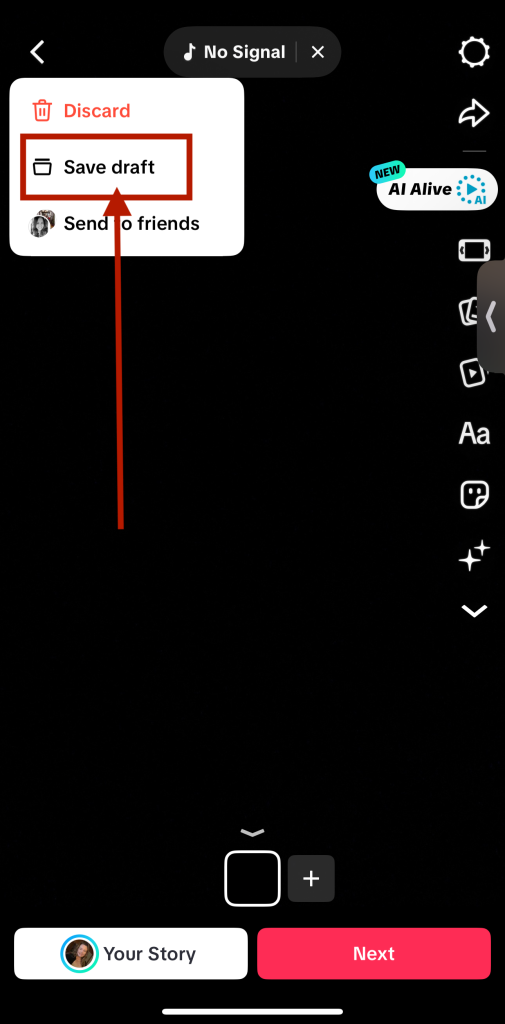
You can create as many drafts as you like, but keep in mind that they take up space on your device.
Where Are My Drafts on TikTok? Answered
Now that you’ve saved your video, you’re probably wondering, where are my drafts on TikTok?
Finding them is easy once you know where to look. Let’s follow these 3 easy steps to find those TikTok drafts.
Step 1: Open TikTok
Open the app and log into your account.
Step 2: Open Your Draft Folder
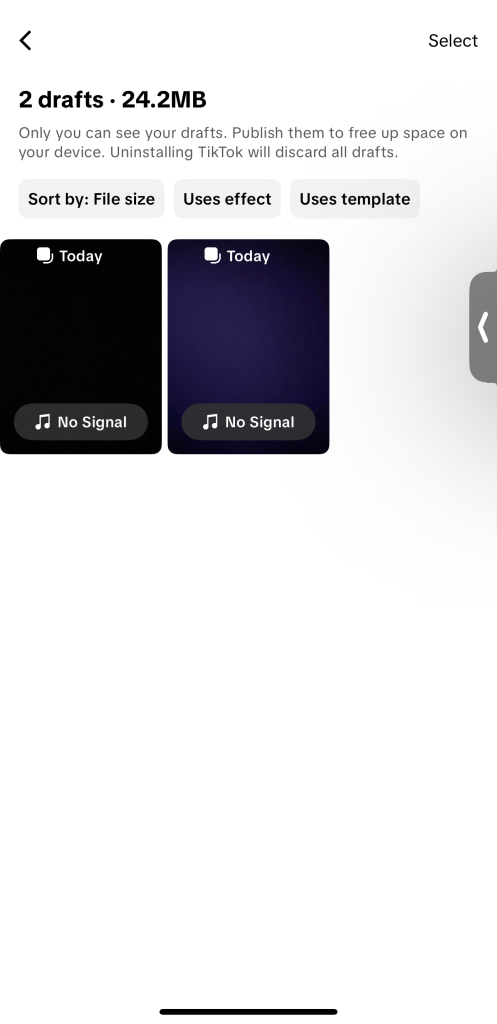
Go to your profile page by tapping the icon in the bottom-right corner. You’ll see a “Drafts” folder at the top of your video grid, usually showing the number of drafts you’ve saved (e.g., “Drafts (3)”).
Tap this folder to view all your saved drafts.
You’ll see thumbnail previews of each one, which you can tap to edit, post, or delete.
What Happens When You Post a Draft?
Once you post a draft, it’s moved out of your drafts folder and published to your profile or the For You Page, depending on your privacy settings.
Drafts cannot be re-edited after posting, so make sure everything looks perfect before you share it.
How to Delete TikTok Drafts
If you’ve created too many drafts or want to clean up your folder, deleting them is easy.
Step 1: Open TikTok
Launch the app and go to your profile.
Step 2: Open Your Draft Folder
Tap Drafts on your profile grid.
Step 3: Delete Your Drafts
In the top-right corner, tap Select, choose the drafts you want to delete, and hit Delete. TikTok will ask for confirmation before removing them permanently.
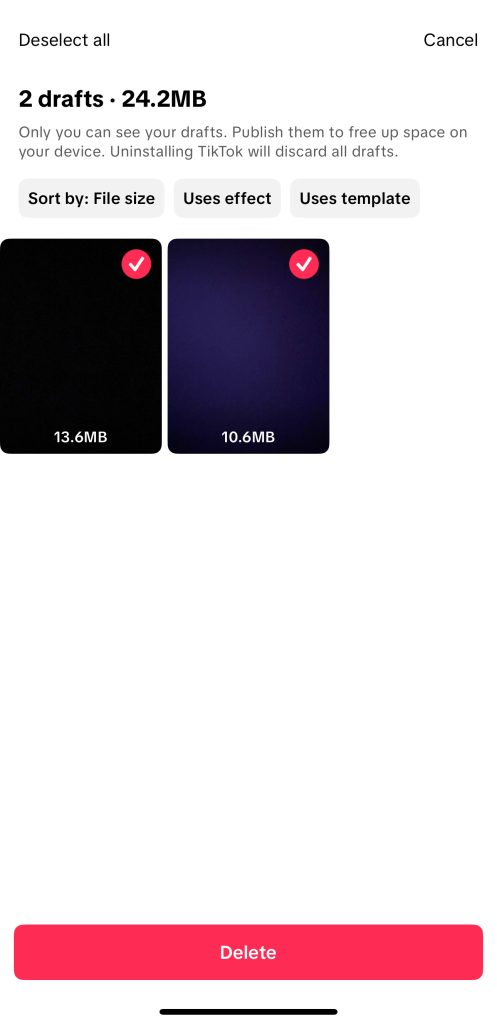
Once deleted, drafts can’t be recovered, so double-check before confirming.
How to Save TikTok Drafts to Your Camera Roll
If you’d like to keep a backup of your drafts or post them later from another platform, you can save them to your camera roll.
Step 1: Open TikTok
Go to your profile and open the app.
Step 2: Open Your Draft Folder
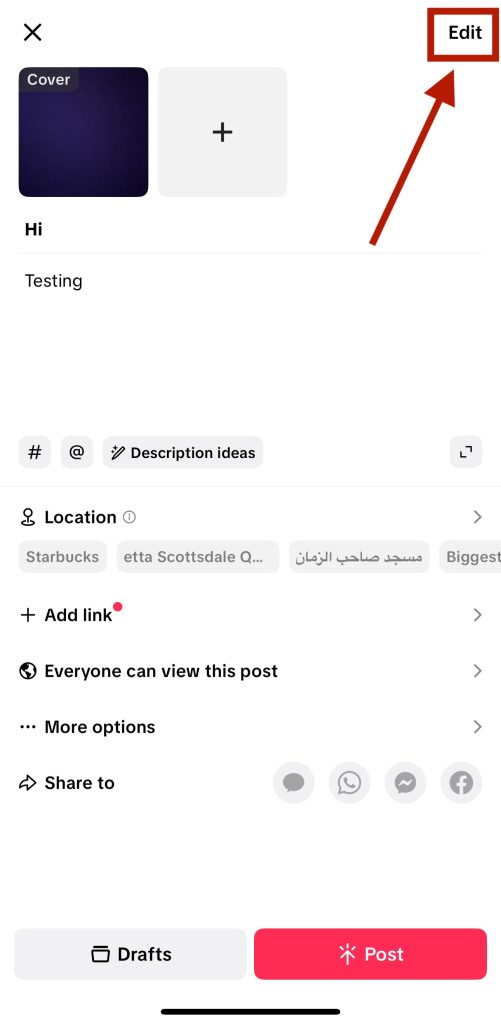
Tap your Drafts folder to access the saved video. Then, tap on the edit button in the top right corner to open the editing interface again.
Step 3: Save Your Draft
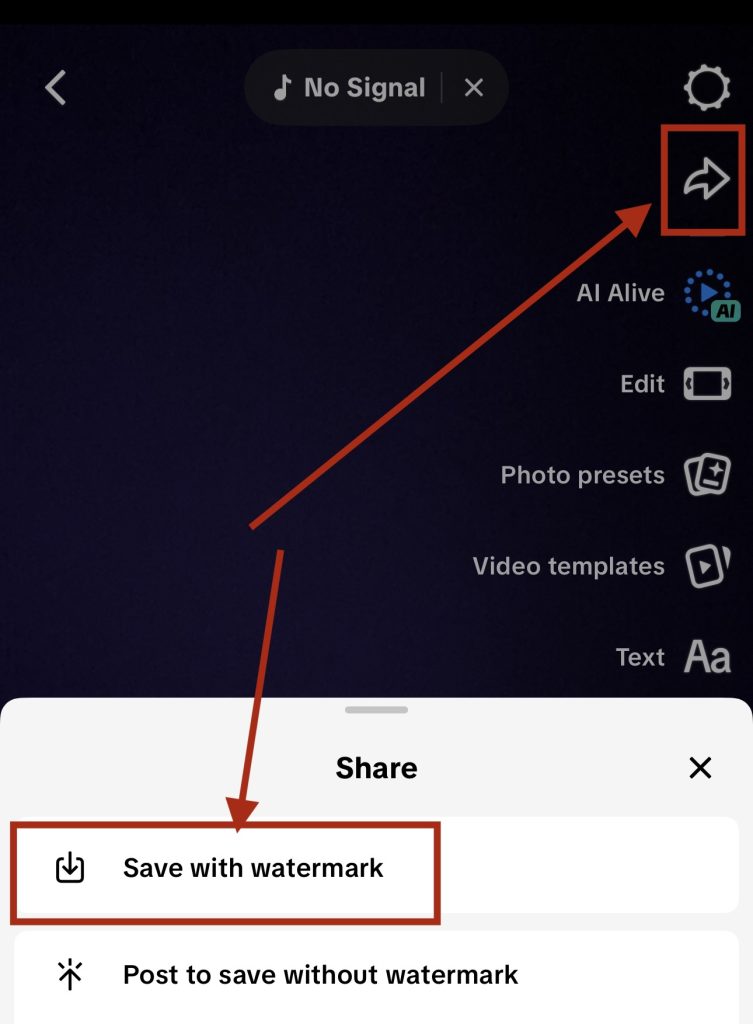
When you are in the editor, tap on the share icon. Then, you will tap from the menu save with watermark before hitting Post or saving again as a draft.
This will store a copy of the video on your phone’s camera roll.
Keep in mind that saving drafts to your phone may not include certain edits like filters or sounds unless you fully render and save the video.
What Can You Edit on a TikTok Draft?
Editing a TikTok draft gives you full control over how your final video looks before it goes live. Think of drafts as your private creative studio: a space to experiment, refine, and perfect your content.
You might be a creator fine-tuning your next viral post, or a business preparing a product video; either way, these are the elements you can adjust in your TikTok drafts.
Music & Sounds
You can change, trim, or completely replace the audio in your draft. Tap the Sounds icon to browse TikTok’s massive sound library, featuring trending tracks, voiceovers, and original sounds.
You can even adjust the volume levels between your video’s original audio and background music to balance narration with background sound.
This is especially useful for businesses that want to highlight product sounds or creators who record voiceovers.
Effects & Visuals
TikTok offers a wide range of effects to make your videos pop, from AR filters and motion blur to split screens and animated stickers. In drafts, you can add new effects or remove ones you no longer like.
For creators, these visuals can turn a simple clip into an eye-catching production, while brands can use effects to make their products look more dynamic and fun.
Filters
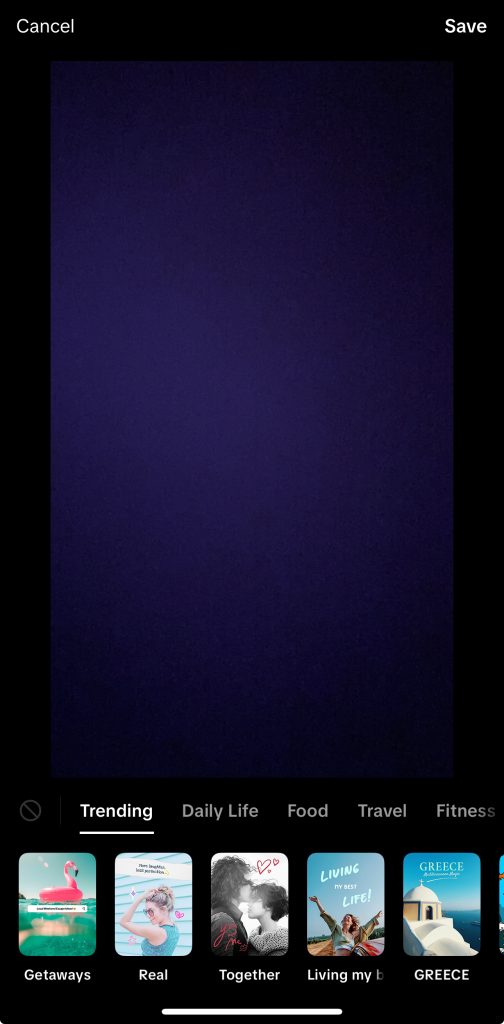
Filters help you set the mood and tone of your video. You can enhance lighting, adjust colors, and apply aesthetic filters that match your brand or style.
A soft pastel filter might work for lifestyle content, while a high-contrast look can make tutorials and product showcases stand out.
Adjusting filters in drafts helps ensure your video fits your visual identity before posting.
Cover Image
Your cover is the thumbnail that appears on your profile grid and gives viewers a first impression of your content.
In the draft editor, you can select the perfect frame, add text overlays, or even emojis to make it more clickable.
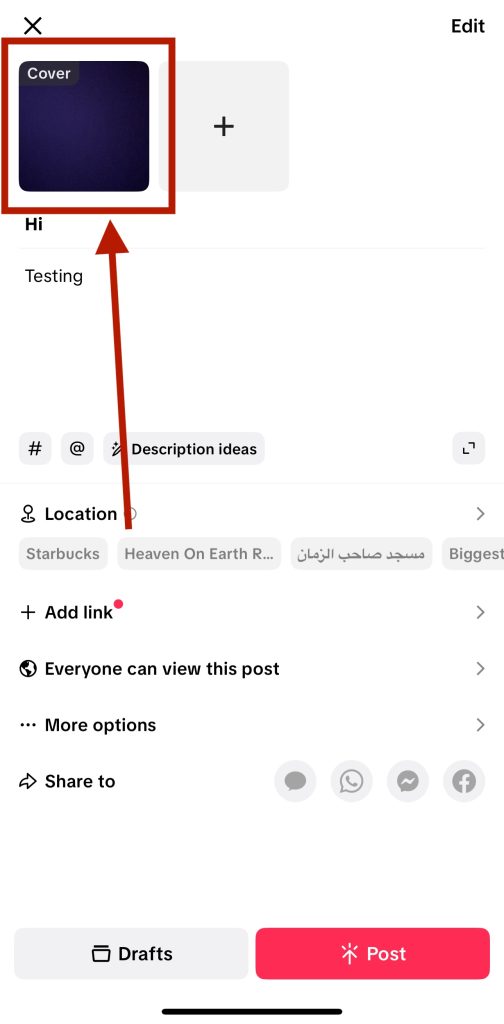
A strong cover image improves your profile’s overall look and increases the chance that new viewers will click on your videos.
Hashtags & Description
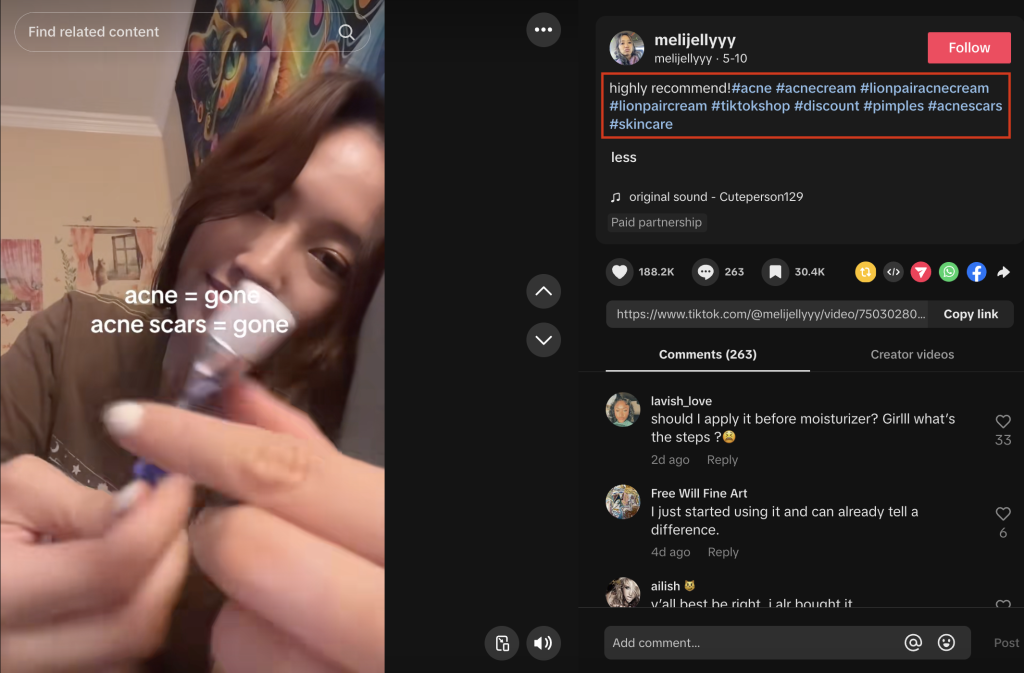
Drafts let you edit captions, tag collaborators, and test different hashtag strategies before posting.
Hashtags help categorize your content and increase discoverability, so take time to mix trending tags with ones that are relevant to your TikTok niche.
Businesses can include branded hashtags to encourage user participation, while creators can use keywords that align with their audience’s interests.
Duration & Order of Clips
You can cut, trim, or rearrange clips within your draft to improve pacing. Shorter, faster-paced videos (typically 15–30 seconds) tend to perform better on TikTok.
Editing clip duration and order lets you refine storytelling, maintain engagement, and keep your content aligned with current attention spans.
Why Editing Drafts Matters
Editing your TikTok drafts isn’t just about polishing a video. At the end of the day, it’s about optimizing performance to reach more TikTok users.
When you know where are my drafts on TikTok, you can be sure to make effective use of them.
Every tweak you make affects how your content performs against the TikTok algorithm once it’s live.
Adding the right sound can help your video appear in trending searches, using the right hashtags boosts discoverability, and refining your visuals keeps viewers watching longer.
For creators, perfecting drafts helps maintain a professional image and ensures your videos reflect your unique style.
For businesses, drafts are essential for planning campaigns, testing creative ideas, and aligning posts with brand aesthetics.
So, learning how to edit drafts effectively means you’re not just creating TikToks, but you’re strategically using every feature TikTok offers to increase your reach, engagement, and overall success on the platform.
All of these editing techniques and TikTok tools also make a big impact on your TikTok marketing strategy.
You can also use a TikTok editor like CapCut to edit your TikTok videos before posting if you prefer.
Can You Download TikTok Drafts or Transfer Them to Another Phone?
Here’s something many users don’t realize: TikTok drafts are stored locally on your device, not on TikTok’s servers. This means if you log out, uninstall the app, or switch phones, your drafts will be deleted.
Unfortunately, you can’t directly transfer drafts between devices. The only workaround is to save drafts to your camera roll before switching phones.
For creators managing multiple devices, this is crucial! Always back up your drafts manually.
If you’re a business or agency managing TikTok content, consider saving drafts to shared cloud storage before reinstalling or switching accounts.
Final Thoughts on How to Save and Find TikTok Drafts

Understanding where your TikTok drafts are stored and how to use them effectively is key for consistent content creation.
Drafts allow you to plan, polish, and organize your TikTok workflow, no matter if you’re a solo creator or managing a brand account.
Remember:
- Drafts are only saved locally on your phone.
- Always back up important videos to your camera roll.
- Use drafts strategically to batch-create and schedule content.
If you’ve ever thought, “Where are my drafts on TikTok?” now you know exactly where to find, edit, and manage them like a pro.
FAQs
How Do I Find My Drafts on TikTok?
Go to your profile page, then look for the Drafts folder at the top of your video grid. Tap it to see all your saved videos.
What Happened to My TikTok Drafts?
If your drafts disappeared, you may have logged out, deleted the app, or switched devices. Drafts are stored locally, so they’re erased if the app is uninstalled or if you sign into a different account.
Why Can’t I See My Drafts on TikTok on Another Phone?
Because drafts are saved to your device, they don’t sync to TikTok’s cloud. You’ll need to save them to your camera roll or post them privately if you want to access them from another phone.
What Does the Drafts Button Look Like on TikTok?
The Drafts folder appears as a gray video thumbnail labeled “Drafts” at the top left of your profile grid. Tap it to open and manage your saved content.